Debugging Silent Edge Composition Failures in XM Cloud
Learn how to diagnose the dreaded empty page, when Sitecore Edge returns a stub layout and your head app crashes with "route undefined".

I changed one nav link in Sitecore, refreshed my Next.js head app, and the dev server 500'd with this:
That stack trace is a lie. The problem is not in my head app. It is upstream, in how Sitecore Edge composed (or failed to compose) the layout for that route. The Content SDK reads layout.sitecore.route, and when Edge hands back an empty composition, layout.sitecore is undefined, so the read throws.
I have hit this enough times now that I keep a fixed triage order. Here is how I find the real cause in about a minute instead of chasing my Next.js code.
What "silent" actually means here
When Edge can resolve a route, it returns a fat JSON blob: the route, its placeholders, every rendering, and the resolved datasource fields. Many KB. When something in that composition breaks, Edge does not throw an error you can read. It returns a stub where rendered is an empty object.
That stub is tiny and always the same shape:
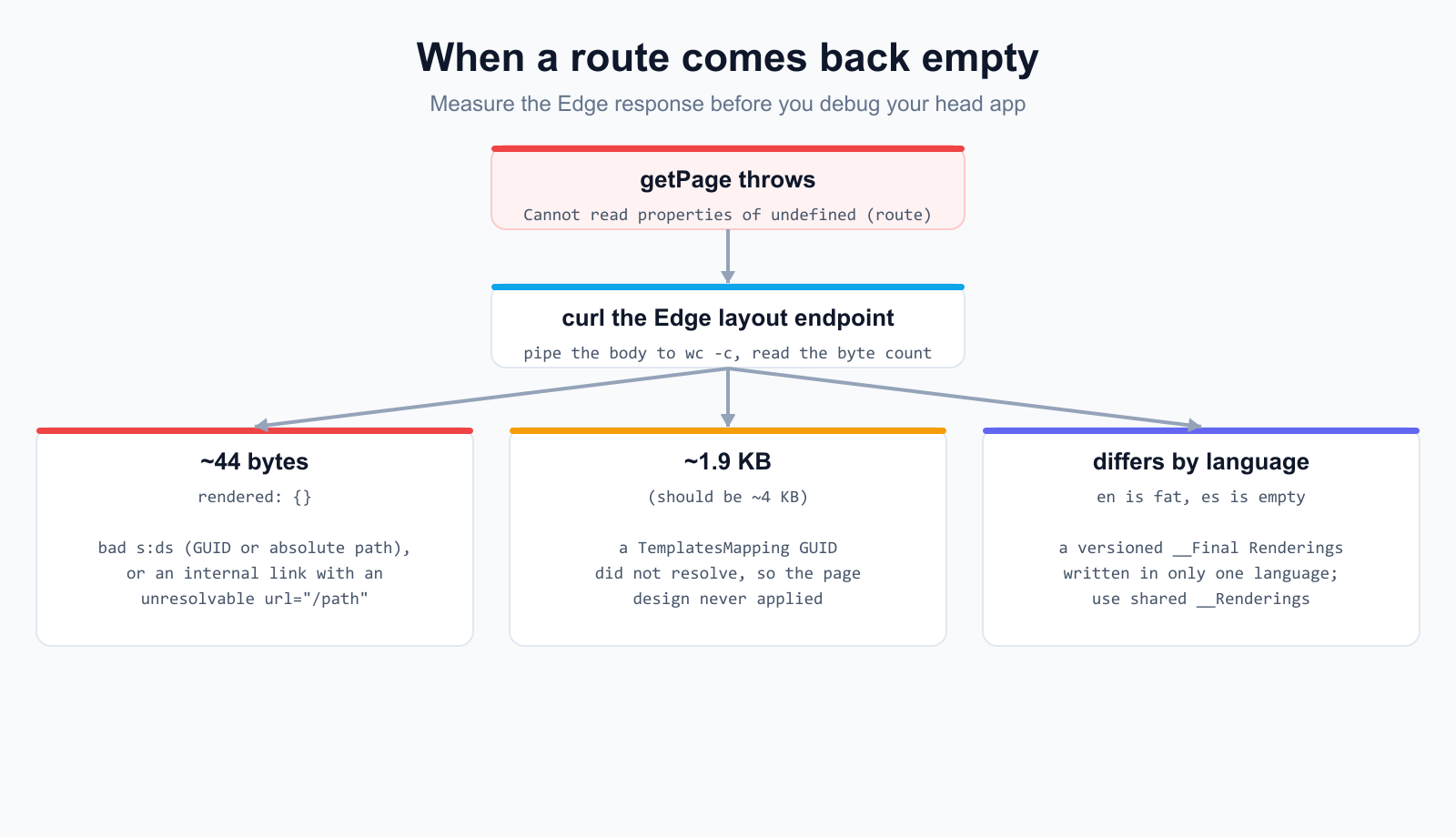
That is 44 bytes. The byte count is the whole tell. A failed compose is about 44 bytes, a route that composed but is missing fields is a few KB, and a healthy page is 15 KB or more. So before I open a single source file, I measure the response.
Triage step 1: curl the Edge layout endpoint
Skip the head app entirely. Hit the Edge GraphQL delivery endpoint directly and pipe the body to a byte counter. Your context ID is the SITECORE_EDGE_CONTEXT_ID from the head app's env file.
If that prints 44, you have a composition failure, and you now know it is a Sitecore-side data problem, not a head-app bug. The fix is one of the three things below. The preview context reads master directly, so you do not need to publish to test a change with this command.
Triage step 2: drill in with PowerShell
Once a route gets past 44 bytes but still looks wrong (say the header renders but has no data), save the response and walk the route object. I am on Windows, so I use ConvertFrom-Json and drill into the placeholder I care about.
If $route comes back null on a non-44-byte response, the layout composed but the route node did not, which usually points at a page-design mapping problem (more on that at the end). If the rendering is there but fields is empty, the datasource did not resolve.
Cause 1: a bad s:ds on a partial design
This was my first repeat offender. A partial design's __Renderings entry has to point its datasource at a PD-scoped Data item using a local path. A GUID or an absolute content path in s:ds does not error. It silently makes Edge return rendered: {}.
Here is the part that bit me, before and after:
The local: form requires a Data folder under the partial design with an item of the right name, like <PD>/Data/Header. Edge resolves local: against the PD item, so the datasource and its fields come back populated. One trap to call out: an empty s:ds="" does not break composition, but it never resolves a datasource either, so the rendering comes back with no fields. Empty is not a fix, it just hides the problem in a page that still looks half-empty.
Cause 2: an unresolvable internal link in a multilist
This one is nastier because it fails the whole page, not just the broken component. When Edge expands a multilist on a datasource (think NavLinks on a header), it inspects each link item's general Link field. If a member is linktype="internal" with a url="/some/path" that does not resolve to a real Sitecore item, Edge abandons the entire layout response and hands back rendered: {}.
I verified this by toggling one nav link three ways and watching the byte count:
- linktype="internal" url="/destinations/spain" with no such page -> 44 bytes, whole page dead
- linktype="internal" id="{guid-of-a-real-page}" -> full layout
- linktype="external" url="https://www.h10hotels.com/en/destinations/spain" -> full layout
What masked the rule for me at first: the Home link used url="/", which does resolve to the site's home page, so a single-link test looked fine. The moment I added real destination links with paths that did not exist yet, every page went dark. The fixes:
For demo content I lean on external URLs with real upstream addresses. They make the demo look real and they sidestep the trap entirely. For production internal links, use linktype="internal" with an id, never a bare path.
Cause 3: a versioned __Final Renderings that only got the en value
This one does not zero out the byte count, it splits behavior by language. On the partial-design template, __Final Renderings is a versioned field. If you write to it without specifying a language, you only touch en. The es-ES version stays empty, so /en serves styles and /es serves a route with no layout structure.
Two ways out. Either update __Final Renderings for every language version, or, when the layout structure is meant to be the same across languages, write to __Renderings instead. __Renderings behaves as a shared field here, so one write covers all languages and translation stays purely on the data side.
The near-miss: a copy-pasted TemplatesMapping GUID
Not every failure is a clean 44 bytes. A page design only applies when the Page Designs root has a TemplatesMapping entry mapping the page's template GUID to the page-design GUID. If you copy that mapping between sites and forget to update a GUID, the page design does not resolve. The route still composes, so you get a response, but it drops from around 4 KB to around 1.9 KB. The chrome is there, the design-driven placeholders are empty.
So I treat byte count as a spectrum, not a yes or no. 44 bytes is a hard compose failure. A 1.9 KB page that should be 4 KB is a page design that did not resolve. Both are visible from the same curl before I ever touch the head app.
Summary
- A getPage 'route undefined' crash is almost always an Edge composition failure, not a head-app bug.
- Curl the Edge layout endpoint and read the byte count first: about 44 bytes is a failed compose, a few KB may be missing fields, 15 KB or more is healthy.
- Use PowerShell ConvertFrom-Json to walk sitecore.route and find the empty placeholder or null route.
- Three common killers: a GUID or absolute path in a partial design's s:ds, an internal link with an unresolvable url="/path", and writing a versioned __Final Renderings in only one language.
- A copy-pasted TemplatesMapping GUID is a softer failure: the page composes but drops from about 4 KB to about 1.9 KB.
The habit that saves the most time is resisting the urge to debug the Next.js layer when getPage throws. The head app is just reporting what Edge gave it. Measure the Edge response, let the byte count point you at the cause, and fix the data.
 Made in React Bricks