Driving Sitecore XM Cloud Authoring with an MCP Server
Learn how to wire an MCP server to the Sitecore Authoring GraphQL API so an AI coding agent can create items, compose layout XML, and provision sites, without SPE elevation.

I had a content-ops problem. I needed to provision SXA sites, model templates and renderings, and author a pile of datasource content for some branded XM Cloud demos. The usual move is Sitecore PowerShell Extensions, but on this environment SPE elevation was not available to me. No SPE console, no scripted item creation that way.
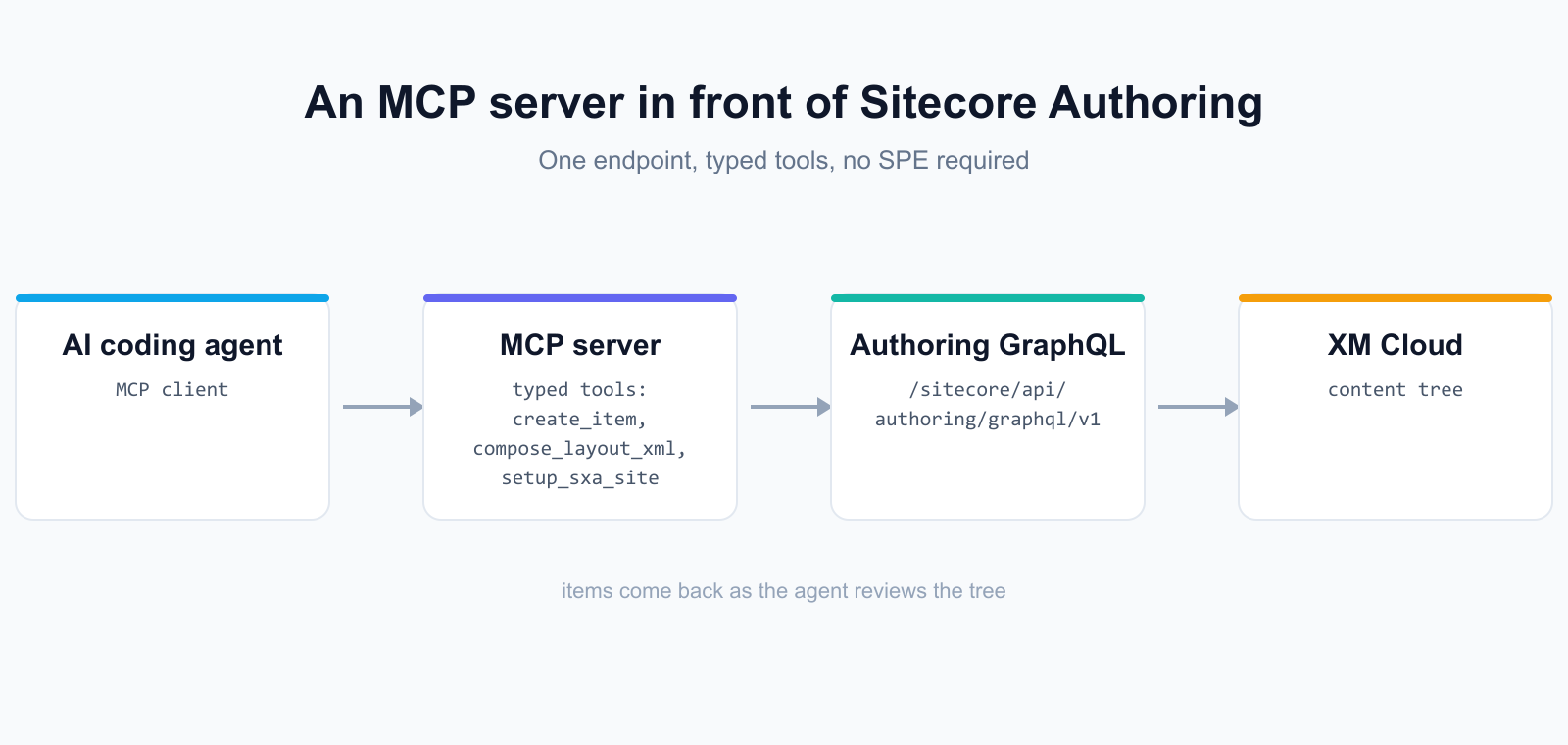
So I went the other direction. I wrapped the Sitecore Authoring GraphQL API in an MCP server and let an AI coding agent drive it. The agent calls tools like create_item and compose_layout_xml, the server turns those into GraphQL mutations against the CM, and the items show up in the content tree. No SPE required.
Here is how it fits together, the tools I exposed, and the schema gotchas that cost me time so they don't cost you any.
What MCP buys you here
MCP, the Model Context Protocol, is a standard way to expose tools and resources to an LLM client. The client sees a list of tools with typed inputs and calls them. You write the server once, and any MCP-capable agent can use it.
The win is that I'm not writing a one-off Node script for every content task. I describe what I want in plain language, the agent picks the right tool, and the server handles auth, the GraphQL shape, and the response parsing. When SPE is off the table, the Authoring GraphQL API is the reliable path for programmatic content ops, and MCP is a clean way to put that path in front of an agent.
The endpoint and the auth
Everything talks to one endpoint on the CM: /sitecore/api/authoring/graphql/v1. You authenticate with a bearer token. I support two ways to get one, and the server tries them in order:
- A client id and secret pair, read from SITECORE_CLIENT_ID and SITECORE_CLIENT_SECRET. This is what I use for unattended runs, including the MCP server itself.
- The token cached by sitecore cloud login, which lands in .sitecore/user.json. Handy for local interactive work.
The tools the server exposes
I kept the tool surface small and close to what the GraphQL API already does, plus a few that bundle a multi-step flow so the agent doesn't have to orchestrate it:
- create_item, update_item, get_item, list_children for basic tree work
- query, a raw GraphQL escape hatch for anything the typed tools don't cover
- compose_layout_xml to build the __Renderings layout XML for a page or partial design
- setup_sxa_site to provision a whole SXA site in one call
- upload_media for the presigned-URL media flow
- create_item_template to model new templates
A tool definition is just a name, a description, and a JSON-schema input shape. Here is create_item, trimmed to the essentials:
The mutation underneath
The handler sends a standard createItem mutation. One thing worth calling out: in CreateItemInput, parent is an ID, so you pass the parent's itemId, not a path. If you only have a path, resolve it to an itemId with a get_item first.
Gotcha 1: introspect before you trust an example
The biggest time sink was trusting field names from public docs and a sample MCP I ported from. The Authoring schema has drifted from what the docs show, and the docs lag. Two real examples bit me.
First, the top-level item query takes ItemQueryInput, not ItemSearchInput. The sample I started from used ItemSearchInput, and every get_item threw on the input type. Language lives inside that where clause too. There is no separate top-level language argument.
Second, the Language type exposes iso, not isoCode. CreateLanguageInput takes iso and regionalIso, not isoCode and regionalIsoCode. The docs and the sample both used isoCode, which fails with "field does not exist on type Language". So the rule I follow now: introspect the schema first, then write the query. One introspection call settles it.
On fields(), pass the boolean args explicitly. On this CM the accepted ones are ownFields and excludeStandardFields. An older note of mine said to pass three booleans, and that was wrong for this tenant: includeStandardFields and withLanguageFallback both throw "does not exist" here. Which is exactly the point. Don't trust my old note either. Introspect the type and use what the schema actually reports.
Gotcha 2: batch your mutations into one request
When an agent fires off twenty update_item calls one at a time, you pay for twenty round trips and a lot of tokens echoing each response. For anything past about five mutations, I have the agent build a single aliased mutation and send it through the raw query tool instead.
GraphQL lets you alias the same field multiple times in one operation. Each alias is its own updateItem with its own input variable. One HTTP call, one response. I used this to flip a batch of nav-link items from internal-url to external-url in a single shot.
Generate the alias list dynamically. The agent builds u01..uNN and the matching $iNN variables from the array of items it wants to change, then sends the whole thing once. I converted a batch of nav-link items this way in a single request instead of one round trip per item.
What it actually built
This wasn't a toy. With the server in place, an AI coding agent provisioned the SXA sites, modeled the templates and renderings, and authored the datasource content for two full branded demos, a hotel build and a retail build. Every item below was created over the Authoring GraphQL API through these MCP tools, with SPE elevation never available.
Summary
- When SPE elevation isn't available, the Authoring GraphQL endpoint at /sitecore/api/authoring/graphql/v1 is the reliable path for programmatic content ops.
- Wrapping that endpoint in an MCP server lets an AI coding agent create items, compose layout XML, and provision SXA sites through typed tools.
- Authenticate with a bearer token from a client id/secret pair or from the sitecore cloud login cache in .sitecore/user.json.
- Introspect the schema before trusting any example: it's ItemQueryInput not ItemSearchInput, and Language uses iso not isoCode.
- For more than about five mutations, send one aliased batched mutation instead of many round trips.
The pattern generalizes past Sitecore. Any system with a real API and a stubborn permissions story is a candidate for a thin MCP server. Put the operations behind typed tools, teach the agent the schema gotchas once, and let it do the repetitive content work while you review the result in the tree.
 Made in React Bricks