One Component, Every Brand: Themes and Rendering Variants in XM Cloud
Learn how to make a single component wear any brand using CSS-variable themes, Sitecore Styles, and rendering variants, with zero brand-specific component code.

The fastest way to make a component library unmaintainable is to fork a component per client. You start with Hero.tsx, then a prospect wants their look, so someone adds H10Hero.tsx. Six months later you have a dozen near-identical files and every bug fix has to be applied a dozen times.
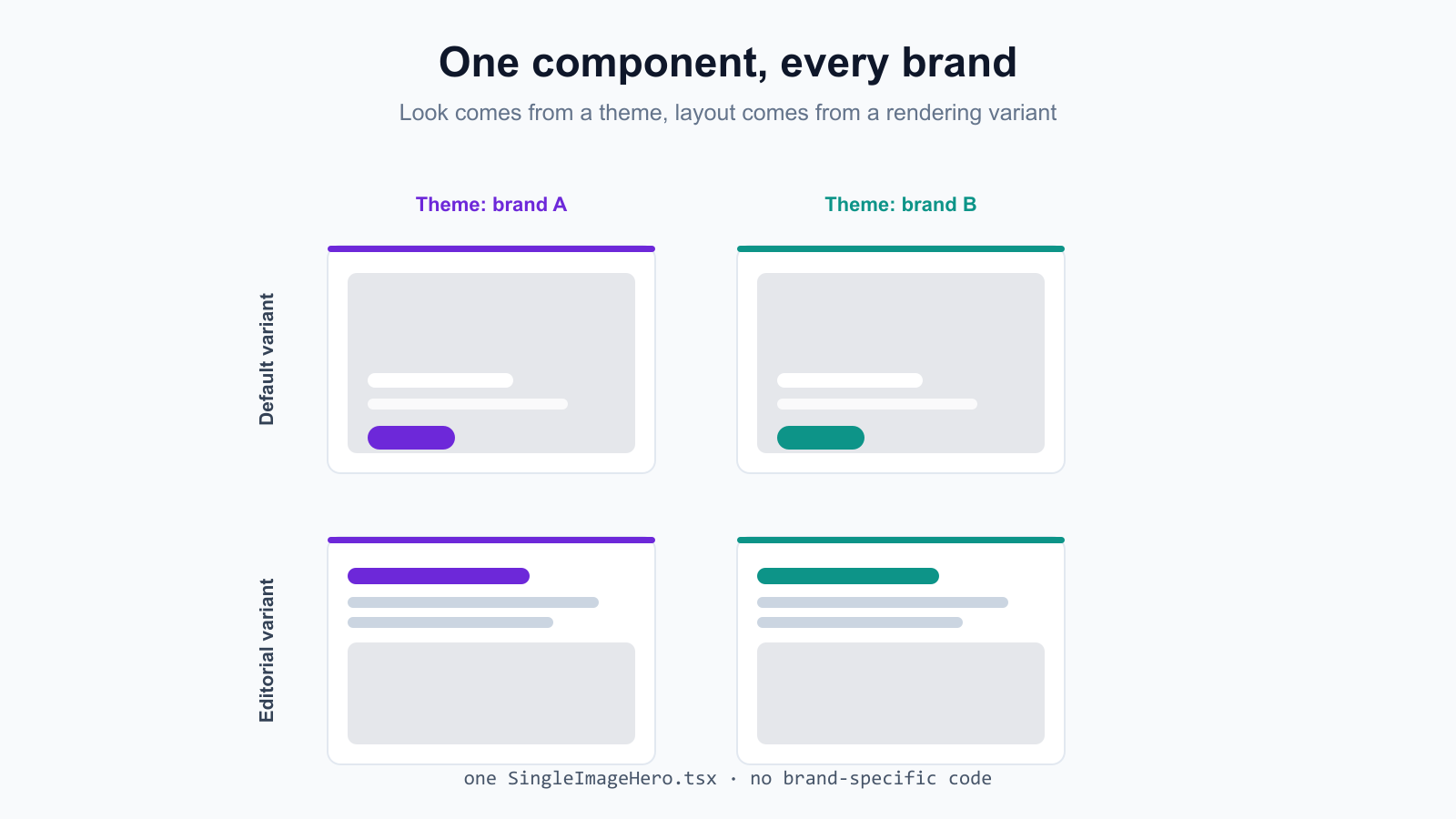
I went the other way. In our XM Cloud sandbox there is exactly one hero component, and every brand the demo serves gets its own look without a single brand-specific line of React. This post shows how that works. CSS-variable themes and Sitecore Styles handle the look, rendering variants handle the layout, and a folder convention keeps the whole thing scalable as components multiply.
The proof is a live retail demo I built. It is one head app, multisite within, and the branding you see is applied entirely through a theme plus a variant. No H10Hero.tsx anywhere.
The split: look vs layout
The whole model rests on separating two things that people usually tangle together.
- Look (colors, fonts, radius, the brand feel) comes from CSS custom properties. A theme is just a set of values for those variables. The component never names a brand color, it reads var(--brand-primary).
- Layout (the markup and structure of the section) comes from rendering variants. The Default variant is an image-background hero with overlay text. The Editorial variant is text-first with the image underneath. Same component, same fields, different DOM.
Keep those two axes independent and a single component can render as any brand in either layout. Authors pick the theme and the variant in Pages. Developers never touch code to onboard a new brand.
The token contract
Everything starts with a contract: the list of CSS variable names every theme has to fill in. This file ships neutral defaults so a page renders sanely before any brand is applied. The real values get injected per site at render time, which I cover in the next section.
Brand identity does not live in this file. It lives in a Sitecore Theme item under each site's Settings folder, so authors own it. This file only defines the variable names and a safe fallback.
Injecting a brand per site
Each site has a Theme item holding its colors, fonts, and radius. A small ThemeStyle component reads the active site's Theme and emits an inline :root block that overrides the defaults. That is the entire mechanism. There is no per-brand stylesheet to import and no class to remember.
One detail bit me, so it is baked into the snippet below. The compiled CSS bundle loads after this inline block, so a plain :root selector loses the cascade and every variable snaps back to the tokens.css fallback. Doubling the selector to :root:root raises specificity just enough to win without resorting to !important.
Swap the site, the Theme item changes, the inline block changes, and every component on the page re-skins. The component code stays frozen.
A component that reads the contract
Here is the real hero. Notice what is missing: no brand names, no conditional 'if H10' branches. It reads Sitecore fields, and its styles reference the CSS variables. It also accepts a params.Styles slot, which is how Sitecore Styles flow in.
The CSS for both variants references tokens, never literals. That is what lets a theme repaint the same DOM.
Default and Editorial are two named exports of one file. Sitecore picks which one renders. The CTA is brand-primary in both, because that color is a variable, and the variable is whatever the active site's theme set it to.
The variant GUID gotcha
This one cost me time, so I want to be explicit. With SXA Headless, you select a rendering variant by setting the FieldNames parameter on the rendering placement. The trap is that FieldNames expects the Variant Definition GUID, URL-encoded, not the variant's display name.
If you put a plain string like 'Editorial' there, Edge does not throw. It silently falls back to the Default variant. Your layout looks wrong and nothing in the logs tells you why. The fix is to encode the GUID, with %7B and %7D standing in for the braces.
When a variant 'does not apply' on a deployed page, check this parameter first. Nine times out of ten it is a name where a GUID should be.
The folder convention that keeps it scalable
One component is easy. The thing that breaks down at scale is naming and placement once you have heroes, promos, editorial blocks, and forms. The rule I follow: every layer mirrors the same category grouping, and the component name states its specific variant.
So it is SingleImageHero, not Hero. When VideoHero and MultiImageHero land next to it, the generic name would have been a liability. Avoid generic names the moment a category exists.
Because the grouping is identical at every layer, a rendering's Datasource Location can be scoped to the matching category, so authors only see hero items when they place a hero. Templates, renderings, content, and React all line up, and a new sibling component drops into a predictable slot.
Why one head app per tenant
The model assumes one head app per Sitecore tenant, multisite within it. The retail head app serves several brand sites at once, each picking its own theme and its own variant per placement. The hotel head app does the same for hotel brands.
That is how the live retail demo exists. It is the retail tenant's head app, one component set, and the brand you see is a theme plus a variant chosen in Pages. Onboarding another retail brand is a new site with a new Theme item, not a new React file.
Summary
- Split branding into look (CSS-variable themes + Sitecore Styles) and layout (rendering variants), and keep the two axes independent.
- Define a token contract with neutral defaults, then inject per-site brand values with an inline ThemeStyle block driven by a Sitecore Theme item.
- Use :root:root in that inline block so the compiled CSS bundle can't override the brand back to the fallback values.
- Write components that read var(--brand-*) and accept a params.Styles slot, never hardcode a brand color or branch on a brand name.
- Select variants with the URL-encoded Variant Definition GUID in FieldNames. A string name silently falls back to Default at Edge.
- Mirror one category grouping across templates, renderings, content, and React, and name the specific variant (SingleImageHero, not Hero).
- Run one head app per tenant, multisite within, so a new brand is a new site plus a Theme item, not new code.
There is no H10Hero.tsx in this codebase, and there never will be. There is one SingleImageHero.tsx that any brand can wear. That is the payoff of treating look and layout as data, not as forks of your component tree.
 Made in React Bricks