
Secure Sitecore Logins with ADFS and Identity Server
Enable Seamless SSO, Claim Mappings, and Automatic User Provisioning in Sitecore XM 10

Intro
When working in an enterprise environment, user management can quickly become complex. Granting backend access to Sitecore authors, approvers, and admins needs to be secure, role-based, and ideally—automatic. In this article, we'll walk through how to configure Sitecore Identity Server to integrate with Active Directory Federation Services (ADFS), enabling:
- Seamless Single Sign-On (SSO) with enterprise credentials
- Automatic Sitecore user creation on first login
- Claim-based role mapping using Identity Server transformations
- Passing the original ADFS token downstream for additional context or auditing
End-to-End Login Flow
- User navigates to the Sitecore login screen.
- Identity Server detects an external identity provider (ADFS) and redirects.
- ADFS authenticates the user and returns a signed token.
- Identity Server validates the token and performs claim transformations.
- The transformed claims are returned to Sitecore with an authorization code.
- Sitecore exchanges the code for tokens and creates (or updates) the user profile.
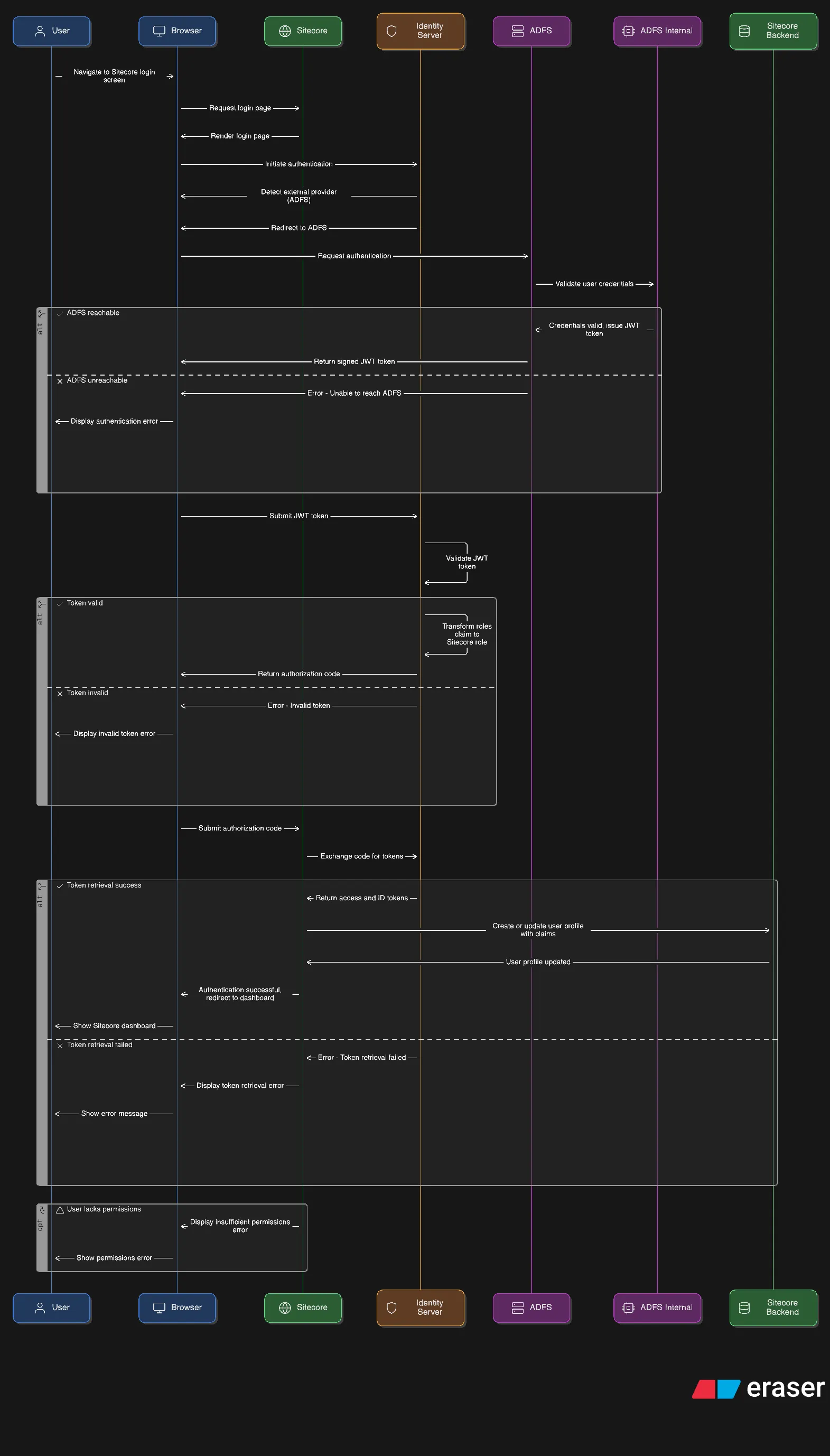
Step 1: Configure the ADFS Provider in Identity Server
The identity provider is registered in Sitecore.Plugin.IdentityProvider.ADFS.xml. This includes the ClientId, Authority, and most importantly, the claim transformation mappings.
Step 2: Add Claim Mappings to Identity Server
Claim transformations allow you to map ADFS claim values to Sitecore-friendly formats. These include:
Example 1: Email Mapping
Example 2: Role Mapping with Pattern Transformation
This maps an ADFS role like MarketingContent Creator to a Sitecore role like domain\MarketingContent Creator.
Example 3: Admin Role Injection
This sets the isAdmin flag if the user belongs to the appropriate group in ADFS.
Step 3: Enable Custom Claims
To forward the original ADFS token or custom values, we extend the Identity Server claims via CustomClaims.xml:
These values can be consumed by Sitecore CM or other connected services.
Step 4: Programmatic Hook for Token Validation
In ConfigureSitecore.cs, we attach to the IdentityServer middleware pipeline and hook into the OpenID Connect events:
This does two things:
- Stores the original token for auditing (optional)
- Executes all custom claim transformation classes
Step 5: Automatic Sitecore User Creation
Sitecore automatically creates users when it receives a valid identity with claims. This is enabled by default in XM 10’s federated authentication pipeline.
Important: To ensure users get the correct roles:
- Claim transformations must produce
roleclaims - Those roles must match Sitecore roles (including domain prefix)
Example:
Summary
By integrating ADFS with Sitecore Identity Server, you:
- Reduce friction for enterprise users with seamless SSO
- Ensure secure access using role-based claim mappings
- Automate user provisioning with complete profile and permissions
- Optionally capture and forward tokens or custom identifiers
This setup keeps your Sitecore instance secure, scalable, and aligned with enterprise identity standards.
 Made in React Bricks